

Creating a virtual tour doesn’t have to be expensive or complicated.but the truth is you can build one for free with simple tools and an easy step-by-step approach.
No matter if you’re in real estate, run a small business, teach online, or create content, this guide explains how to create a virtual tour at zero cost, in simple, easy-to-follow steps.
What Is a Virtual Tour?
A virtual tour lets people explore a place online in an interactive way. Instead of just looking at photos, They can look in every direction, move from room to room, and get a clear sense of the layout.
Free virtual tours are commonly used for:
1. Homes and apartments
2. Schools and training centers
3. Shops and offices
4. Showrooms and cafes
Is It Really Possible to Create a Virtual Tour for Free?

Professional virtual tours may come with advanced features, but for basic needs, free tools can easily get the job done.
You can create a free virtual tour using:
1. A smartphone or basic camera
2. Free 360 photo apps or platforms
3. Free hosting and sharing options
It’s all about knowing which tools to use and how to get the best results from them.
Step-by-Step: How to Create a Virtual Tour for Free
Step 1: Use Your Smartphone or Existing Camera
There’s no need for expensive gear to begin.
Options:
1. Smartphone with panorama or 360 camera support
2. Basic 360 camera (if already available)
With free apps, many modern phones can easily capture wide-angle or 360-style photos.
Step 2: Capture 360 Photos of the Space
Users care more about clarity than perfection.
Tips for capturing:
1. Stand in the center of the room
2. Keep the camera steady
3. Take photos in good lighting
4. Capture every important area
Before shooting, ensure the rooms are tidy and free from clutter.
Step 3: Use Free Virtual Tour Software or Platforms
Several free platforms allow you to create a virtual tour without spending anything.
Free features usually include:
1. Uploading 360 photos
2. Linking rooms with hotspots
3. Basic navigation controls
4. Shareable tour links
These tools are ideal for beginners and small projects.
Step 4: Connect Rooms Using Hotspots
Hotspots help users move easily from one area to another.
For users, this is what makes a virtual tour feel realistic:
1. Clear navigation
2. Easy room-to-room movement
3. Simple labels like Living Room or Office Area
Try not to clutter the tour with too many buttons.
Step 5: Preview and Test the Tour
Before sharing, experience the tour like a visitor.
Check for:
1. Smooth navigation
2. Correct room order
3. Loading speed
4. Mobile compatibility
Simple, easy-to-navigate tours tend to perform better than complicated setups.
Step 6: Share Your Free Virtual Tour
Once it’s ready, sharing your tour is quick and effortless.
Best places to use it:
1. Your website or blog
2. Google business listing
3. Property or product listings
4. Social media platforms
5. WhatsApp or email
Free platforms usually offer an easy link or embed feature for sharing.
Best Tips to Make a Free Virtual Tour Look Professional

Even on free platforms, you can still enhance quality by:
1. Shooting in daylight
2. Using simple navigation
3. Writing short, clear descriptions
4. Keeping camera height consistent
5. Avoiding blurry images
No matter the features, user experience should always come first.
Limitations of Free Virtual Tours
For users perspective, understanding the limitations is important:
1. Fewer customization options
2. Watermarks may appear
3. Basic analytics or none
4. Storage or views may be limited
Free tools are ideal for getting started, trying ideas or working on small projects, free tools are a perfect fit.
Who Should Use Free Virtual Tours?
Free virtual tours work best for:
1. Individual property owners
2. Startups with limited budgets
3. Teachers and trainers
4. Small businesses
5. Freelancers and creators
6. Startups with limited budgets
They help you move online without any financial risk.
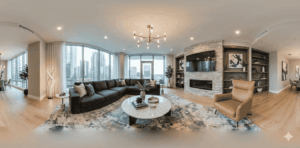
If you’re looking to create a virtual tour for free, starts with what you already own, free tools, and a strong focus on user experience.
Expensive tools aren’t necessary to give people a real view of your space. A simple, easy-to-navigate virtual tour builds trust, keeps users engaged, and helps them make confident decisions.
Start free, and upgrade only when your needs grow.